Amanah app iconAmanah

Masjid accounts · Donations & expenses · Android

Accounts the whole committee can trust.

Amanah is a free, offline bookkeeping app for masjids, madrasas and Islamic centres. Record every donation and expense, keep Zakat separate, and share a clear monthly report — with no account, no subscription, and nothing leaving the phone.

Amanah screenshot
Amanah main screen

Built to be questioned

Nothing is hidden, nothing is silently changed

A masjid's books are not private property — the people who gave the money are entitled to see what happened to it. Amanah is built for that. Corrections are recorded rather than applied quietly, so a committee can look back at any month and see what was changed and when, instead of being handed a version that has already been tidied up.

Every change stays visibleEdits and deletions become entries in the history, not gaps in it.
Restricted funds holdZakat, Sadaqah, Fitrana and Qurbani cannot be spent on the wrong thing.
Share without exposing donorsPublic-safe reports hide names and phone numbers before the report leaves your hands.
No account, no serverThe records live on your phone — we never receive them.

What the app stores and what it never sends is set out in the privacy policy.

What Amanah does

From the Jumu'ah box to the yearly report

Income

Every donation, filed where it belongs

  • Jumu'ah collections, box counts, individual donations and monthly chanda
  • Count notes and coins with a denomination counter, and record who counted
  • Split one donation across funds — part Zakat, part general
  • Numbered receipts with the amount in words and the Hijri date
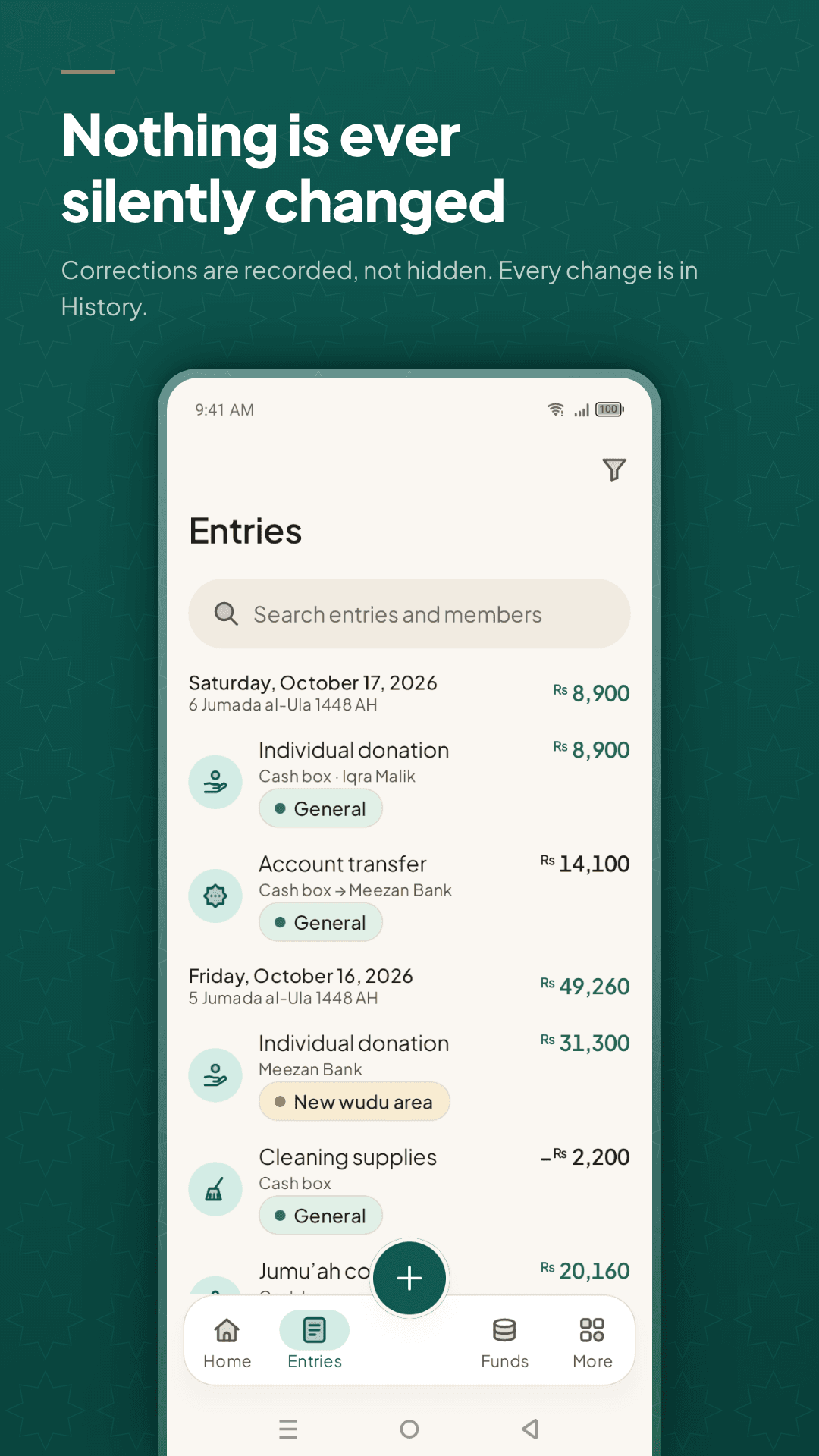
Amanah entries list — donations, transfers and expenses by day, with Gregorian and Hijri dates and the fund each one belongs to

Funds

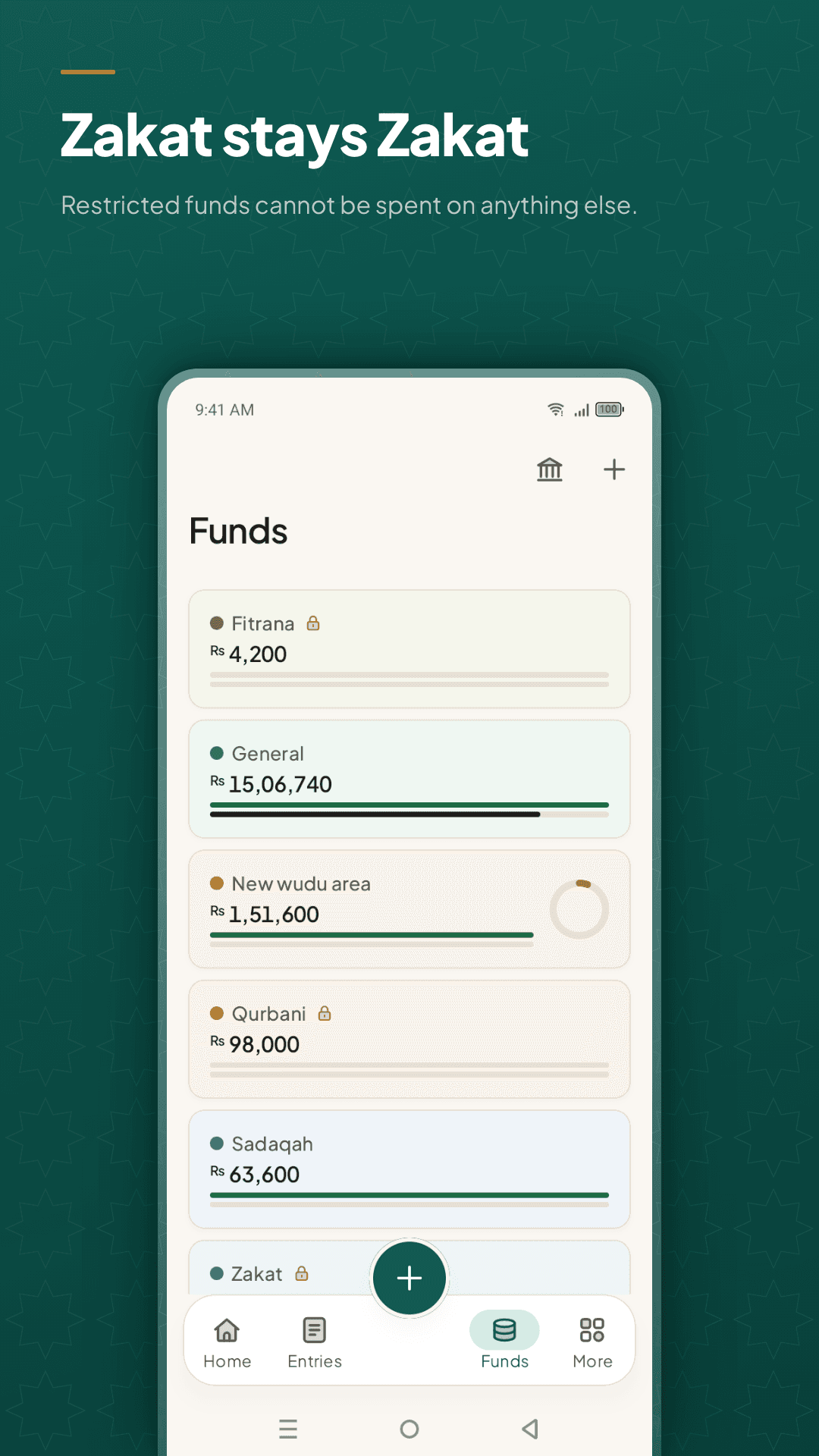
Zakat stays Zakat

  • Separate funds for Zakat, Sadaqah, Fitrana, Qurbani, Waqf and construction
  • Set what a restricted fund may be spent on; the wrong expense is refused
  • A warning before a fund or the cash box would go below zero
  • Create any fund your masjid actually uses
Amanah funds screen — Zakat, Sadaqah, Fitrana and Qurbani locked as restricted funds beside General and a construction project

Outgoings

Bills, salaries and the cash box

  • Electricity, gas, water, maintenance, construction and iftar
  • Imam, muazzin, khadim and teacher salaries, with advances tracked
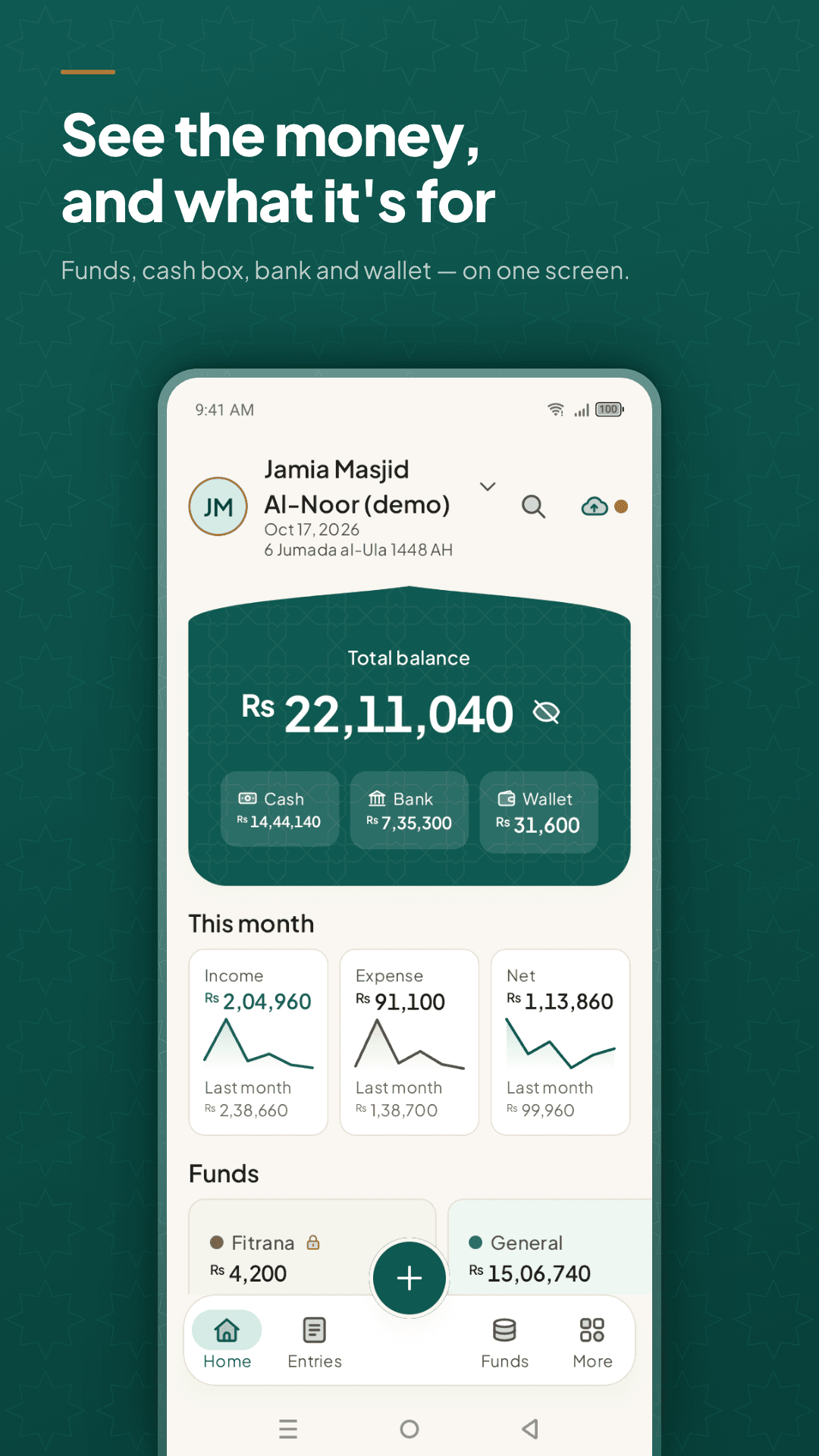
  • Cash, bank and mobile wallet balances on one screen
  • Cash count: compare the money in hand with the app and record the difference
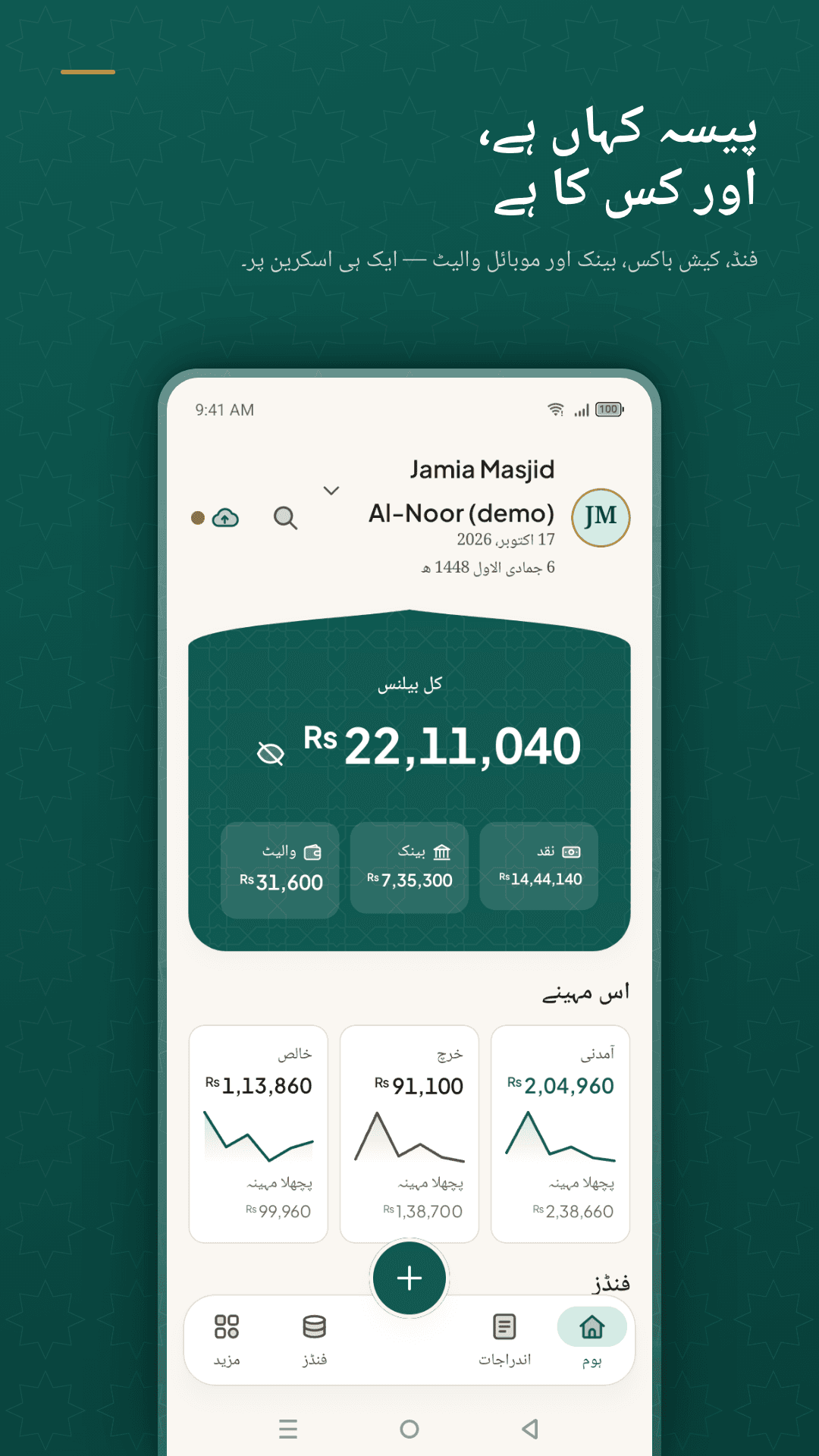
Amanah home screen — total balance split across cash box, bank and mobile wallet, with this month's income and expense

Reports

Something you can put on the notice board

  • Monthly, fund-wise, category-wise and yearly reports
  • Share as a WhatsApp image, PDF, Excel or CSV
  • Public-safe mode hides donor names and phone numbers
  • A full history of every action, so nothing is hidden
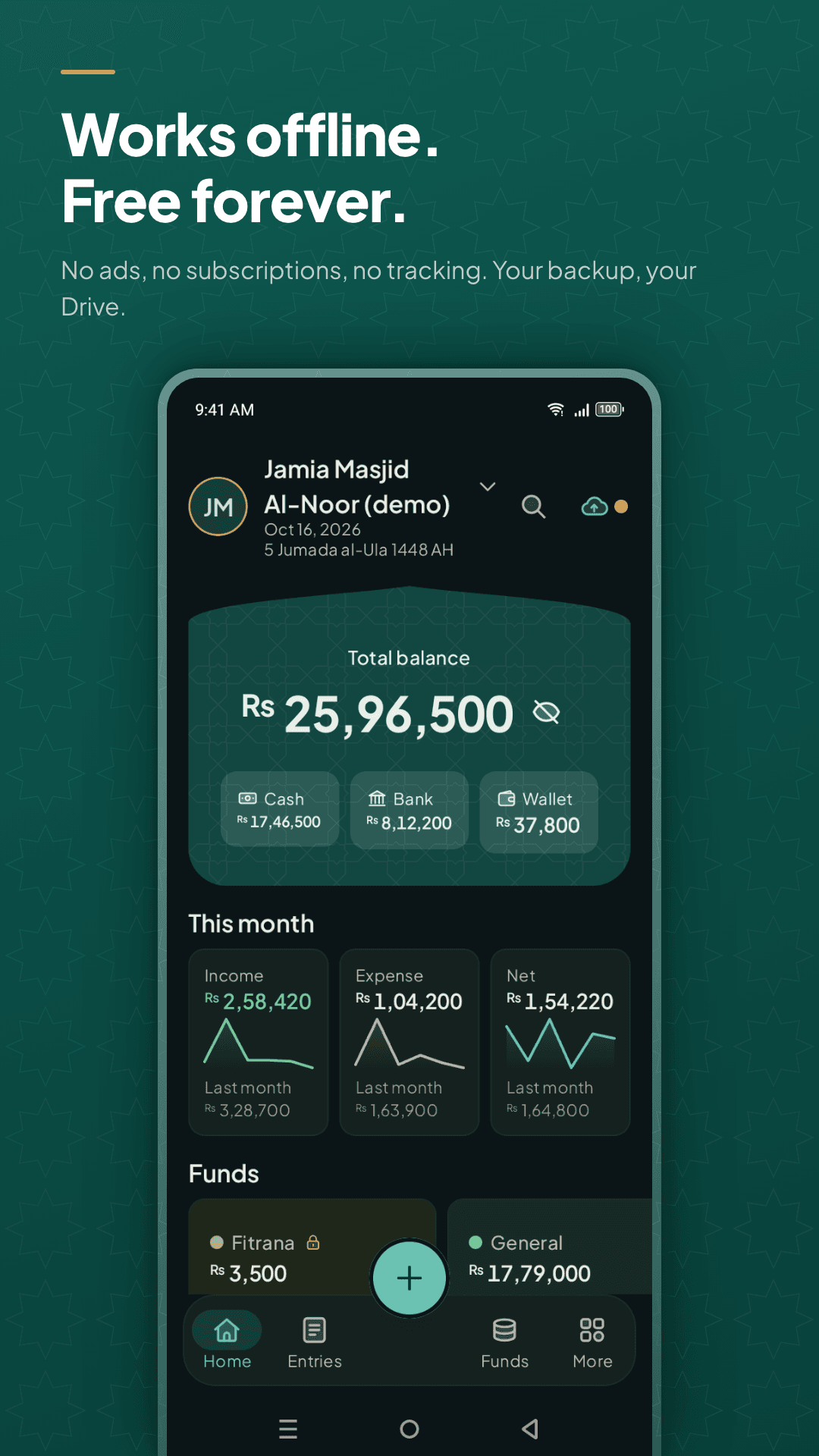
Amanah in dark mode — the same masjid accounts, working offline with no ads and no subscription

Everywhere

Six languages, right-to-left, any currency

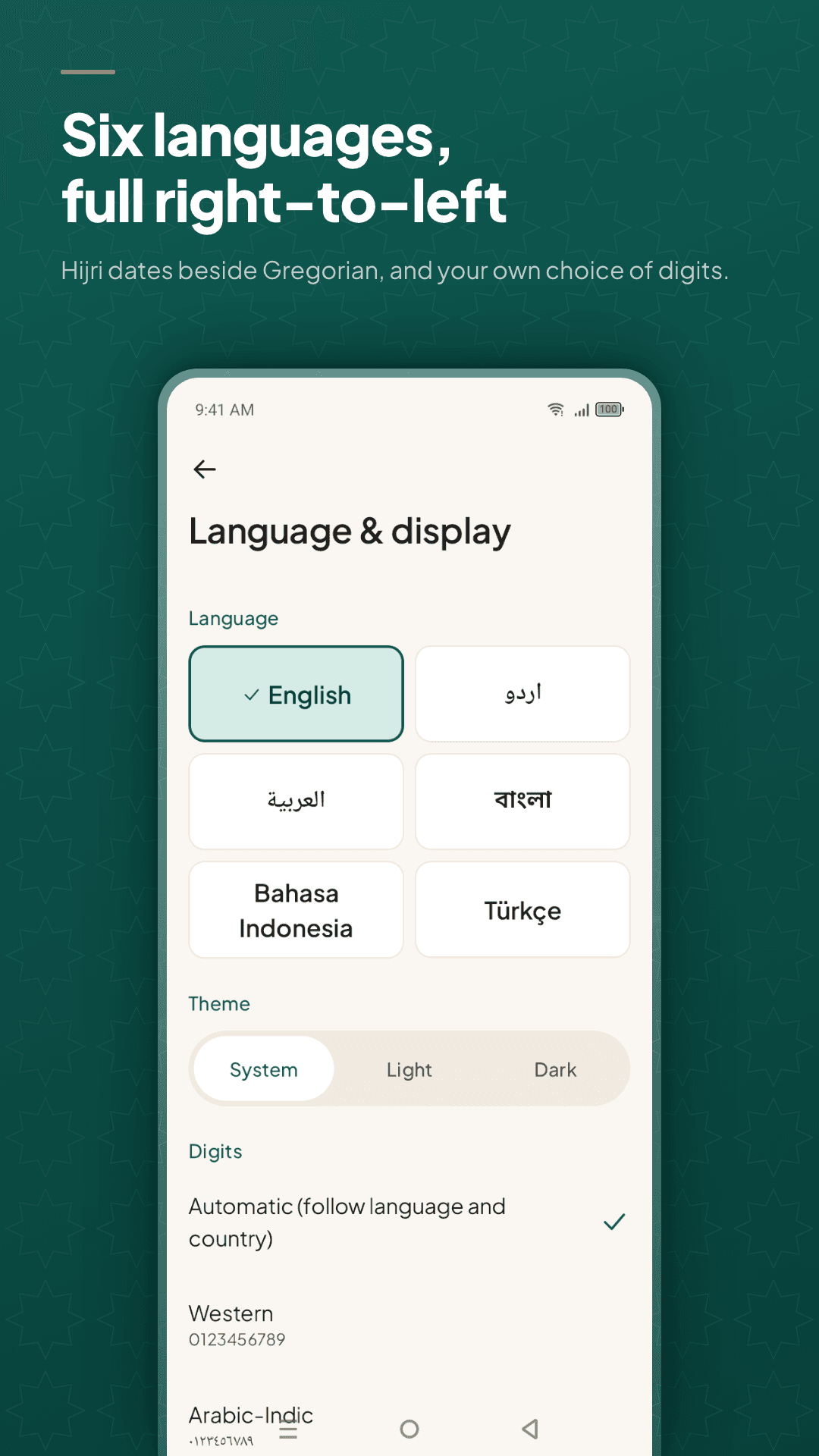
  • English, اردو, العربية, বাংলা, Bahasa Indonesia and Türkçe
  • Hijri dates beside Gregorian, and your own choice of digits
  • Any currency, with local number styles
  • More than one masjid or madrasa on the same phone
Amanah language settings — English, Urdu, Arabic, Bengali, Bahasa Indonesia and Turkish, with a choice of digit style

Amanah is a bookkeeping tool, not a religious authority. It keeps the funds you create separate and refuses spending from the wrong one, but what may be paid from Zakat, Sadaqah or Waqf is a question for your local scholar. The figures in these screenshots are from a demo masjid.

Pricing

Free, and meant to stay that way

Every part of Amanah is free: funds, receipts, reports, backup, all six languages. There are no ads, no subscription, no paid tier and no sign-up, because a masjid should not have to pay a monthly fee to know what is in its own cash box. Nainnie Labs builds it as sadaqah jariyah.

  • Free — no ads, no subscription, nothing held back
  • No account; the records stay on your phone
  • Optional daily backup to your own Google Drive, with a passphrase if you want one

If Amanah helps your masjid, share it with another committee and remember us in your du'as.

Take a look

Amanah, screen by screen

Amanah home screen — total balance split across cash box, bank and mobile wallet, with this month's income and expense
Amanah funds screen — Zakat, Sadaqah, Fitrana and Qurbani locked as restricted funds beside General and a construction project
Amanah entries list — donations, transfers and expenses by day, with Gregorian and Hijri dates and the fund each one belongs to
Amanah language settings — English, Urdu, Arabic, Bengali, Bahasa Indonesia and Turkish, with a choice of digit style
Amanah in dark mode — the same masjid accounts, working offline with no ads and no subscription
Amanah in Urdu — the full interface right-to-left, with Hijri dates beside Gregorian

From the blog

More on Amanah

Questions

Amanah — frequently asked

Is Amanah really free?

Yes — completely. No ads, no subscription, no paid tier and no sign-up. Nainnie Labs built it as sadaqah jariyah, which is why there is nothing to buy and nothing held back.

Does Amanah work without internet?

Fully. Every entry, fund, report and receipt is produced on the phone, so it works in a masjid office with no connection. The only thing that uses the internet is the optional backup, and that goes to your own Google Drive.

Where is the masjid's data kept?

On your phone, in storage only Amanah can read. There is no Amanah account and no Amanah server, so we never receive your entries, your donors or your photos. If you turn on backup, the file goes to your own Google Drive and you can set a passphrase so only you can open it.

Can I keep Zakat separate from the general fund?

Yes. Zakat, Sadaqah, Fitrana, Qurbani, Waqf and any fund you create are kept apart, and you choose what each restricted fund may be spent on — Amanah then refuses an expense from the wrong fund. It keeps the money separate; what may be paid from Zakat is a question for your local scholar.

What stops someone quietly editing an old entry?

Nothing is ever silently changed. Edits and deletions are recorded as corrections and stay visible in the history with what changed and when, so a committee can look back at any month and see the full picture rather than the tidied one.

Can I share a monthly report with the committee?

Yes — monthly, fund-wise, category-wise and yearly reports, shared as a WhatsApp image, PDF, Excel or CSV. Public-safe mode hides donor names and phone numbers, so the same report can be pinned on the notice board.

Is it only for masjids?

No. It suits any small community treasury: madrasas, Islamic centres, musallas, surau, welfare trusts and community committees. Anything that collects money for a purpose and has to show where it went.

What languages and currencies does it support?

English, اردو, العربية, বাংলা, Bahasa Indonesia and Türkçe, with full right-to-left layout. Any currency, local number styles and digits, and Hijri dates shown beside Gregorian.

What happens when the treasurer changes?

There is a handover: a backup file and a closing report that together hand the new treasurer the complete position, so the accounts do not restart from zero or stay locked on someone's old phone.

Can one phone handle more than one masjid?

Yes. Each organisation keeps its own funds, entries, members and reports, and you switch between them. Useful for a committee that looks after a masjid and a madrasa, or a trust with more than one site.

Can Amanah read a payment screenshot?

It can read the amount, date, reference and sender from a bank or mobile-wallet screenshot and show you what it read before anything is saved. That reading happens on the phone with a model inside the app, so the image is not uploaded.

Is Amanah on iPhone?

Not yet — it is on Google Play for Android today. If an iPhone version would help your committee, write to us and it will count towards building one.

Amanah app icon

Hand the committee the whole picture.

Free on Google Play. Works offline, with no account.

Questions? hello@nainnielabs.com · Privacy policy